Showing posts with label ArcticBase. Show all posts

Saturday, 23 November 2019

Behind The Door- Week 4


Week 4 - Formative Hand-in Week


Some of the most important parts of this project is the snow. Like I've mentioned previously, if the snow doesn't look great then the whole scene doesn't look believable. A way to make something realistic is by showing evidence of history or marks that people would have made. What is one mark left behind on snow? Footprints. Footprints in snow tells you a lot of information, depending on the amount it can tell you if there is a small amount of people or a large number that was in the same location recently. The colour of the snow is another tell tale sign, if there is repeated back and forth which doesn't allow the snow to settle, then it turns into a slush of snow turned into patches of water and ice.


It should be noted that the brown snow is due to both mud/soil from the ground underneath the snow, and also dust or pollutants. I need to consider the location of the base to determine what extra things can affect the snow.


This material is made up of the snow material that I created previously with a new footprint shape I created and stamped in.

Since this metal grid texture is also a flat surface, I wanted to show footprints on certain areas that would have a buildup of snow. Obviously if I covered the whole metal floor with a layer of snow, then you wouldn't be able to tell that its metal. 


This is a gif that I made on creating the footprint texture. As you can see it is just built up from small shapes that have parts subtracted or warped, to then create the whole footprint. The pattern of the tread is based on a boot that I found on google images. Also a few things I want to note, I made it so that there is only one type of footprint. This is because I wanted to give the sense of a military base and soldiers would most likely have the same uniform and that makes their footprints fairly similar. 

Another small detail I want to point out is the snow that outlines the footprint. Whenever you walk and make a foot print on something like snow it will never be a straight concave shape. To make space for the foot to step down some of the snow surrounding the foot would be dislodged and pushed away making a sort of ridge around the footstep. One thing that I could do to make this much more believable would be to have some random bits of snow clumps/particles near the footsteps. Since the motion of walking would kick up some snow clumps as well. 
This is a small texture created for the computer screen. I wanted to make it seem as if its older technology to fit in with the whole military feel. I added horizontal lines to give that old computer look. I wanted the screen to be a blaring red screen to give a sense of danger.  Something that could improve this screen would be a screen tear/jitter affect, or even having it animated. Possibly interacting with the computer would play an animation sequence on the screen.


The above image is my master material that I created for this project. So far the components of this is: 

1- A standard material which uses one set of textures for the base colour, normals, rgba combined. 

2- Tiling and offset parameters which allow tweaking of scale position of the textures.

3- Vertex Blending, to be able to paint between two materials instead of having a single standard material.

I know that my master material is pretty bare bones at the moment, but I will slowly add to this when I figure out more of my pipeline for assets, and how I should even create my textures for the most efficient use in UE4. I know that I will most likely add extra parts such as rotation and world alignment. 


Here is the landscape material I have attempted to create. I followed a tutorial to the letter in creating this, however it seems to not work at all. The different materials should be using a heightblend to switch between layer but it doesn't seem to work. For some strange reason there isn't any world displacement (changes in height), the whole landscape texture is flat, and changing the values for the displacement pushes the whole landscape equally. 

This is genuinely a really strange problem because I have asked for help from a multitude of different people, and each person doesn't seem to know why it doesn't work. I also opened the UE4 demo level that was provided with the tutorial to showcase the landscape material, and in there it is also dysfunctional. My only idea of why this is happening is that Epic have changed/updated how landscapes are fundamentally made, making older tutorials obsolete (which has happened with other elements of UE4, eg the light units being updated). 


Here is a close up of both the snow and the metal floor. Something to point out is that there is a nice transition between the thick snow and metal ramp. This transition is helped with the use of a TemporalDitherAA being plugged into the pixel depth offset of the snow material. The only problem with this and anything that looks fancy is that it can be quite taxing on the engine. However since I am focusing on a portfolio piece, this is completely fine.


Lastly one thing I want to mention is the lighting errors on my landscape. For some strange reason the light maps of the landscape aren't blending nicely between each grid, leading to this harsh edge showing the each grids perimeter. I'm not exactly sure as to why this is happening or how to fix this, but I'm sure with more time I would be able to find some sort of fix.

Beauty Shots of the environment

As what is required of us for formative hand-in, I had to take "beauty shots" of my scene. This is basically just pictures of any points of interesting area's and presented in a decent composition. 


In summary of this project

My original goals for the project was a good composition, some technical art and a clear narrative. So far I feel like I have completed the composition, however my narrative is not there yet. There are many elements missing from the scene that are needed to tell the story. I think I may have overestimated what I could do in this project. I spent the whole of week 1 learning and creating the snow and fog in the scene.  To create the fog, I had to first learn Houdini, and then create a smoke texture, and finally apply it to a particle system in Unreal. Although it frustrates me that I spent so long on this part of production, I feel like it was necessary as it allowed me to learn much more about materials and particles in UE4 and was a good introduction to Houdini.

The second week was spent modeling the scene and creating the snow texture. I had a rough block-out in the first week, but by the end of the second week I had almost game ready models minus the collision. I also created the high and low poly versions of the entrance terminal and prepped them for texturing.

The third week was spent creating materials for the whole of the environment, and I created a master material that can be changed easily on the fly within an instance. I also made it so that I could vertex blend between 2 different materials using the red channel. If I had more time I would have added another vertex blend in the blue channel so that I could paint a layer of frost onto the materials as well.

I feel happy that I have learned a lot from this project. But I feel as though there is so much more that I need and want to do. Somethings I would do differently if I could do this project again from the start, would be creating a master material in the beginning. I didn’t do this because I didn’t necessarily know what I needed at the start. But since I now know what I need, it would make it so much easier for myself by setting this up in the beginning. I also learned that I need to be much more thorough with my planning in the beginning. I tried a different method using Trello, but that didn’t really help me that much, what I think works is just a simple excel sheet that shows what’s not done. This would be more useful as it would give a better direction whenever I feel like not knowing what to do. I think also having clear deadlines for each part of the process would give me more motivation

Sunday, 17 November 2019

Behind The Door- Week 3


Week 3 - Textures & Unwrapping


Last week I prepped the Entrance Terminal for baking and texturing. This week I finally get to texture the terminal. At this moment I found out that I was missing some details that I didn't model in my high poly, but their's no reason to worry since I can create what I need in Substance Painter. Also something I kept in mind was the fact that the texture size is a 1024, which doesn't allow for fine details, but also smooths out any blemishes.

The buttons of the phones keypad was something I forgot to make in the high-poly. If I had a higher resolution texture sheet I would have gone back and created the buttons in the high-poly, this way I would get a clean and controlled result. I find that creating buttons in substance has too soft of an edge/bevel, although using a levels on the black mask could allow for more control on the bevel.


The frost that I created is made up of two different layers. The first uses is a more unique painting of general frost, I used a fill onto the black mask, using the ambient occlusion to spread a light colour into the crevices of the terminal. Then I used two different grunge maps to remove and add variation to the ambient occlusion. I would then use paint layers on top to add a more unique touch to the texture. 

The second is for large frost/snowflakes. It's created from a folder with two fill layers inside that have large shapes. Using a black mask on the folder allows me to control the placement and opacity of the snowflakes.    


Below is a resistor that is part of the electrics in the terminal. As an added detail, I wanted to have some wires forcefully pulled out of place to show desperation. I only wanted to texture this small model since it has generic features and would be duplicated a few times. 

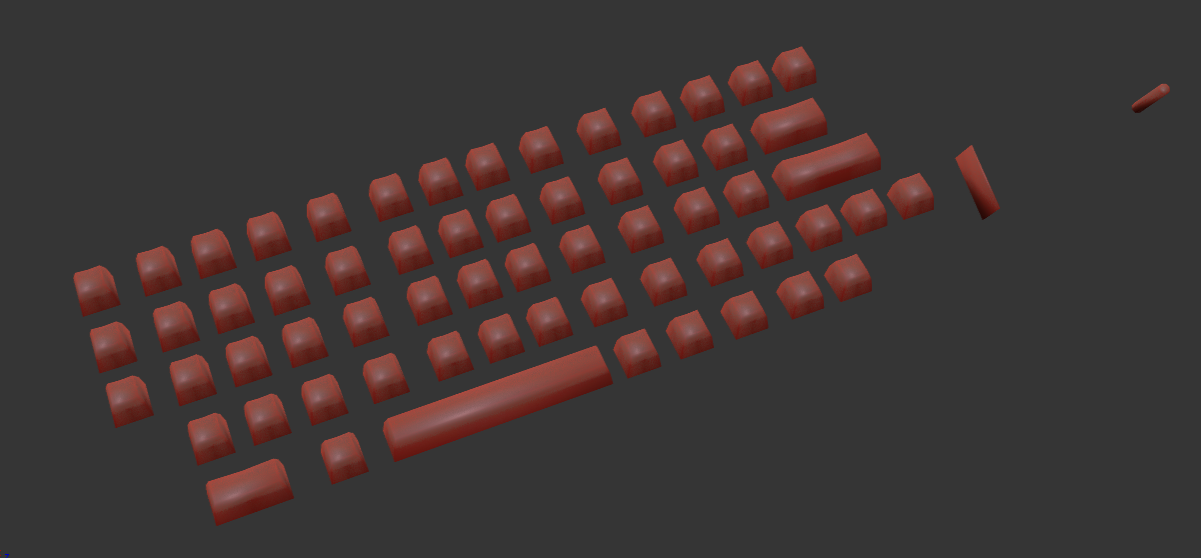
I worked on the keys in the keyboard in a separate substance file my reasoning is that the keys would be floating and obscuring parts of the Terminal, it would also be easier navigating the scene if the keys are separate. 

My environment is mostly comprised of concrete and metal and snow. Since the concrete material will be applied to large structures and the texel density is 1024 per square meter, this concrete will tile a lot. So my goal was to create a texture that is read as concrete, but not too noisy that its noticeably tiling. Since I could add any grime or wear with decals. 
The next material i created was rust. Although looking back, this material is fairly unnecessary as I mostly blended between a clean metal and the metal with some of the rust being revealed, which is below this picture. 
This is a rusty metal, later on I toned down the noise of both the albedo and roughness in the metal. I also removed the height information of the flaking around the rust, since that would only appear on painted metal and this is not a painted metal.

Something that I experimented with was creating deformation on the door. I wasn't exactly sure as how I should approach this, so I did this early on in the week to get a proof of concept. 

What I wasn't sure about was whether to do a high to low bake, or a POM Decal. With the high to low, I could section off one area of the model with a second UV channel to be baked and textured. The only problem with that is making sure that the unique and tiling textures line up and also having a consistent texel density, I'm also not sure if this would work either. 

The other method that I'm more confident with is the POM decal. I've used this in the previous project, and it should work. The only downside to this is that if I want to deform the shape of the door, I would have to manually do this to the low poly. This is also a fairly efficient workflow, as it doesn't require a second UV channel.


Before I spend a long time sculpting a masterpiece, I wanted to see if my theory would be correct first. So I created a quick texture in substance designer and used that as a sort of place holder.


Looking at the result of this I can definitely say that this should be how I should approach creating the deformation on the door. Although it is slighty more engine expensive due to being a decal and a POM. Its efficient and works.

Saturday, 9 November 2019

Behind The Door- Week 2


Week 2 - Composition & Modeling


I feel as though I don't have much to show for this week. Because I haven't necessarily learnt something new or went deeper into UE4. However I have done something and its an important part of the project.

Something that I struggled with in my last project is composition and narrative. My focus was on learning technical aspects that lead to me overlooking the more core principles of an environment: Compostion, Shape Language, and Narrative. 

This time round I wanted to sharpen my skills and prove that I can successfully create an environment with a clear composition and an understandable narrative.

Following on from the draw overs I made last week I started to model out the entrance of this bunker. Unfortunately I made the mistake of not taking a lot of screenshots of the process, but I can break down what I've done.


A lot of the models were quite primitive shapes at first. I got them into UE4 as soon as possible, so that if I keep iterating on the models I could just re-import them and they will stay in the same position. After placing the models into their positions, I worked on adding finer details such creating the relief of the door in the wall. Or creating the hole in the supporting structure to allow a ladder through.


After getting the overall composition down and the models in the scene I started focusing on creating the high poly meshes for my focus areas. 


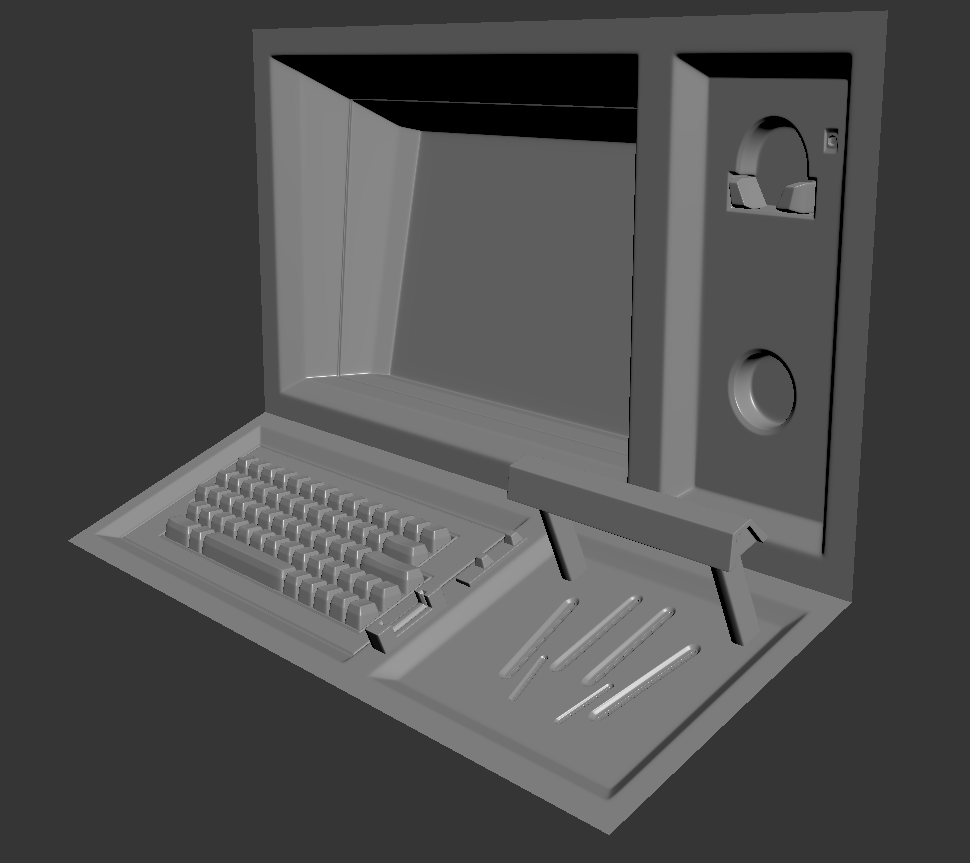
This is the entrance terminal to the bunker. It's basically a bash of a few ideas together. My thought process for this terminal is that its a high security bunker, so they would most likely have multiple layers of security to get in. 

First you would slot in your ID card. 
Then you would type into the computer. 
And finally you would probably have some sort of scan either fingerprints or retina. 

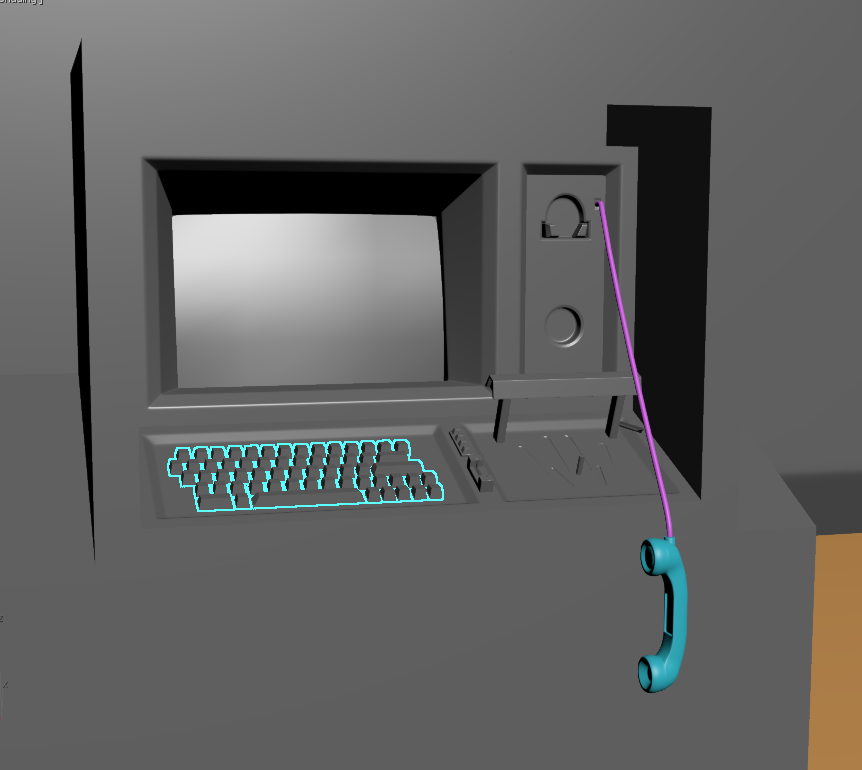
Additionally if the computer is broke or the door doesn't open, you would need to phone for technical help which is why there is a phone.

So with this frame of thought I found references for each stage.


MDT9100 is a car interface. Very retro with large keys.


This is interestingly called a Indentimat, from information I could find online its supposed to be a hand geometry scanner for the infamous F-117 Nighthawk stealth attack program. Although people now link it to the Area 51 conspiracy, that this scanner is used to get into top secret locations in Area 51. I don't really care about this scanners purpose or history, I just really like the shape language.

Along with these references, I also looked at the Nostromo in Alien. 


The ID card slot. And some flashing buttons.


Closeup of the phone.
  

Some of the narrative I wanted to tell is that this person who was killed, desperately tried to get into the bunker. To convey this I had the phone hang down off the line. 

Since this entrance terminal is practically the only object with unique textures, I thought it would be important to get this prepped for baking and texturing as soon as possible, as I can find making unique textures takes longer than making tile-able textures. This is because of getting a good bake result. With the Unwrap I tried to be as efficient as possible, having all the keys in the keyboard to be aligned on the V axis, to make it easier to texture later.


After unwrapping I prepared my model for baking by using a technique called explosion bake, this requires the geometry of the model to be separated by a large distance, this gives space between the cages of the mesh so that there isn't any artifacts caused by overlapping cages.

The other method is to bake by mesh name, which requires you to detach every single mesh and give it a unique name, and give the high poly the same name.  

There are tools that can explode the mesh for you, however I did this manually since this was the first time I've ever tried explosion baking.  


Here's everything together below.


Something to notice as well is that the Screen is not present. The reason for this is because I have separated the screen entirely so that I can do some animated textures and some other cool stuff with it.

The last thing I did this week was finalize the concept of the environment. There were small details that I wanted to have which would make the environment that much more believable, such as the icicles on overhanging surfaces, or the emergency red lights.

The major goal I wanted to figure out was the colour scheme. Some critique I was given was that my scene was quite boring since there was just concrete and metal, which are both quite dull colours. And that I should add a splice of colour. I was looking at Doom 2016, and I noticed that there was a splash of colour that was used to direct the player, and to break up the monotony of the metal and plastic.  


And here is the rough colour concept.


I think a piece of advice that I need to remember for future projects is to go off of other peoples concepts, because I spent a lot of time figuring out everything about this scene, when all of that could be spent on production. And although its great that I can create something original, realistically I won't be able to do this when I am working for a studio. 

Sunday, 27 October 2019

Behind The Door- Week 1

Week 1


Hello! This is a new project that I'm excited to start working on. I technically have a longer time period to work on this compared to the previous project. I have 3 academic weeks plus an enhancement week, which isn't really accounted for. So all together I have roughly 4 weeks for this project. I have the same restrictions that I had last time, 2x2048 texture sheets and a 50k tri budget and a texel density of 1024 per meter squared. 

This project I'm going to do things a bit differently, first of all I'm going to be more free with the materials and textures, since I had so many more textures to spare by the end of the last project. I'm also going to be a lot more consistent with the composition and the story in the scene from the beginning. 

The project that I chose to do is the Behind the Door brief, my reasoning is that the brief is quite open ended with the theme, all I need to follow is that the door is circular and that the environment fits with the style of the door. The project aims are: 
-Work to an authentic, realistic style.
-Collected,collated,analysed and annotated photographic reference for usage.
-Created and use tile-able textures.
-Demonstrated efficient modeling.
-Demonstrated efficient texture usage.
-Create convincing surface properties using PBR materials.
-Stretch goal: Create dynamic elements.


This is very rough sketch of my idea, but I was able to get down on paper what I want to achieve. I wanted a snow environment, and a oppressive mood. The scene should feel hostile and bleak. To do this I wanted a somewhat dark environment where there is a warm light source that contrasts with the cold surrounding. 

The composition is solely around the door, I want the surrounding building to bring the eye towards the door. With values I want to have dark concrete walls to contrast with a lighter colour metal door. There should also be a contrast of roughness between the door and walls.

The story that I want to portray, is that someone was being pursued by a beast or monster. This person hurriedly tried to enter the secure building, however they were too slow. All that remains are bloody hand prints on the doors monitor/keypad, and the trail of a bloody body being dragged away. This story would add an extra layer to the hostile and bleak feelings I want to portray.

References


I was originally started looking into arctic environments and scientific bases. The first place I could think of was the Svalbard Seed Vault. Something that I really liked about this building is that it was an entrance into a mountain, I like the idea of only being able to see a small part of the whole structure. And if the entrance is large then it gives the idea of scale. I also looked into Martian bases as well, since it would also be technically a hostile environment. But the idea of snow just overpowered the martian idea, so i put it aside.
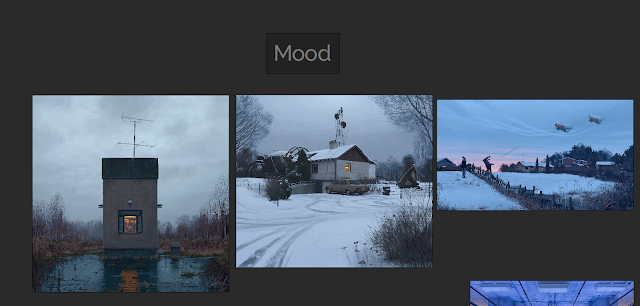

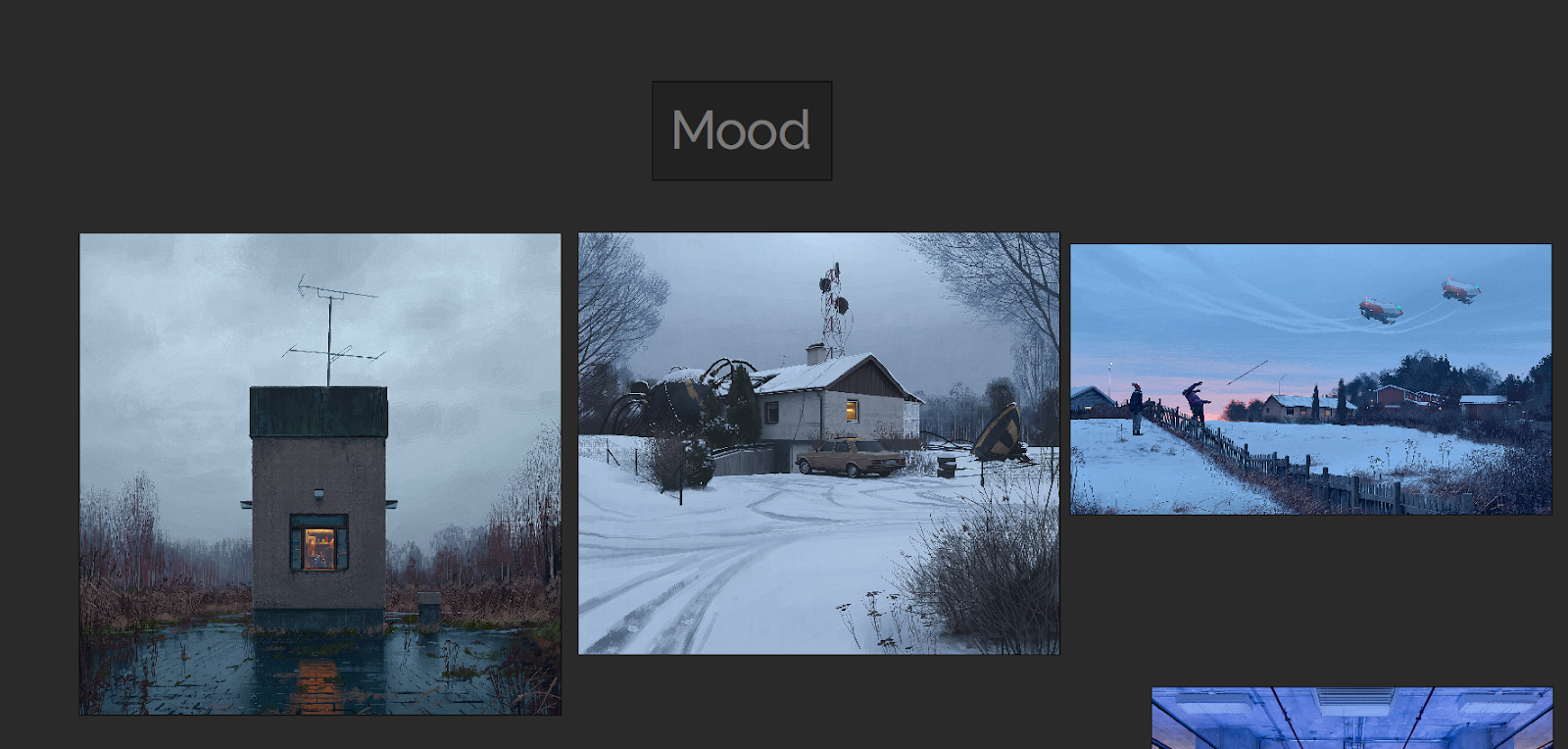
I looked into the work of Simon StÃ¥lenhag for inspiration on colours and values. I knew that he has done multiple paintings of cold/snow environments. You can see that in each painting he has pulled in focus to subjects with using a saturated bright warm colour to contrast with the surrounding cold colours. Also in the middle painting you can see how he controls the eye by using the lines of the trail made by the car; to pull the eye in from the bottom left corner. I could also use this in my own environment with the blood trail. 


For my environment I'm wanting to combine near sci-fi with Brutalism. I feel like the contrast of metal and concrete can work really well together and give a domineering effect. Especially Brutalism can work really well, having a contrast of large simple geometric shapes with the complex and detailed metal work. One movie that I can think of that combines this well is Blade Runner.

Production


The first thing I immediately did was create a block-out and put it into Unreal. The sooner I can get into Unreal, the better. My reason is that I can define shapes and mood early on with simple geometry and lighting. I can also start to set up camera's and draw over the screenshot to brainstorm.


I came to this idea that I needed to lead the player to multiple points of interest that would house the story. The major point of interest would be the door, then the secondary would be a generator or some field equipment that's been destroyed, and lastly the dragged body trail that links the first two points of interest and creates a third that goes way off into the distance. How I would point the player to these locations is by using lights, some of which would be fallen over and pointing to where ever I want the player to go. 

My idea of the environment would be shrouded in thick fog of a snow storm, that heightens the mood, but also means light can be used direct the player. My inspiration from this comes from The Last of Us, where a section of the game you are lead through a snow storm and follow a bunch of burning barrels as your guidance.


After thinking for a while I decided not to spread by points of interest all over the map, and instead hone in onto one key area, which is the door. The advice I got from my last project was to keep it small, and by moving the lights and generator closer to the door, I can keep the environment contained. This may change later on however.

Also instead of working on my models and textures I thought it would be best to focus on the snow storm beforehand. Even if I had the best models and textures, if its in a crap fog then it will all look crap.

Since I had no idea how to create a snowstorm, I looked into the Learn section of the Unreal Engine Launcher (Epic Games Launcher), I remembered that I saw a demo at GDC that showed off particle effects. And that it had some really convincing snow. I downloaded the level and started looking at how they created their particle systems.

One of the major parts of the blizzard particle effect was this animated fog, I looked into how they did this and saw that it was a cloud texture that is in a grid of 8x8 clouds. And that the texture was used in tandem with a ParticleSubUV module within the particle system. This creates an animated particle effect.

Since I knew what I had to create, I then needed to figure out how I could create this texture. After some researching I found that Houdini could do what I wanted. However I felt quite overwhelmed, because I had never used Houdini before. I knew that I would use Houdini at somepoint, but I guess the earlier the better. 


My first attempt at creating the texture is what you could see above, but there were multiple problems with it. First of all the edges of the fog were too crisp, you can clearly see where one particle ends and the next begins. Second of all the animation started off with the fog being small and then getting bigger. The problem is with this, is that you can clearly see where the particle effect spawns and then dies.

What caused these issues, is that the simulation I did within Houdini was an Explosion and not a Billowy Smoke. With an Explosion the is an expansion of gas from an epicenter. What I wanted was a fairly consistent sized shape that would slightly change. And to get that I had to simulate a Billowy Smoke instead.


Here the simulation is attached to a sphere, and the smokes girth inherits the girth of the sphere. This means the shape size stays fairly consistent.

Seeing the actual textures will probably be more understandable.
As you can see there is improvements I have made from the first test to the second. The shapes are a lot less defined, like fog would be, and there is a consistent size.


To create this I first made a sphere and whilst it was selected, I pressed onto the Billowy Smoke in the Pyro FX.


Afterwards I changed some of the parameters within the pyrosolver (this controls the simulation) to get the results I wanted. Cooling rate affects how large the smoke will be. The viscosity affects how tight the smoke stays together and how slow the smoke travels. And buoyancy lift controls how fast the smoke moves upwards.  


After getting the simulation that I want I created my own file cache to store the simulation, and limited it to 64 frames as 8x8 images adds up to 64 frames. This then saves and bakes the simulation, so that you can scrim through the animation without making the computer simulate again.


I then set up an orthographic camera and positioned it above the smoke looking down. This allows me to get a view of the smoke where it's size stays fairly consistent, and for the animated particle I wanted a somewhat circular mass where the edges dissipates randomly. 

After rendering the simulation I could then go within compositing the image.


You'll also want to change from the Scene View to the Composite View so that you can actually see what you're compositing.


To get the grid image I used a mosaic node, this orders the frames of the simulation into a grid of whatever you set it to. However since we're going to use this UE4 it has to be in line with the power of two. This mosaic node also puts all of the frames onto the first frame, so make sure you view that single frame. 

I then used a pre-multiply node which essentially softens the edges of the smoke.  

And then its plugged into an output node, which then takes us to the output section of Houdini.

Using a mantra node allows you to render and export out images. However you only want to render out the current frame you are viewing, so change the Valid Frame Range, to Render Current Frame. 

Lastly all you need to do is when you're rendering out the image to a location make sure that you end the name of the file with .tga. You need to manually write what file it will be exported as.


After all this, I then had to set up the Material in Unreal Engine.
A lot of this is me reverse engineering what I could find, and I slowly understood what the nodes functions were.


There are two extra textures that supports and adds to the 8x8 SubUV I created. I'll go over how I made those later. I'll first explain what I'm doing in this material. 

Firstly I'm tiling the support textures to match the SubUV, so that they effect the individual clouds of smoke rather than all of them at once. 

Next I'm using a Depth Fade to affect the opacity of the edges so that the clouds fade between each other, effectively giving a softer edge where the clouds intersect with each other or other objects.

SphereMask makes it so that you can see through the material at a certain distance, I'm coupling it with the PixelDepth node which outputs the distance the distance from the camera to the pixel being rendered. So it basically allows you to see clearly in a certain distance, and makes anything far away from the player opaque. 

I also plugged scalar parameters into each part of the graph that allows for multiple instances of this material to be used in different scenarios. 

I also want to make it clear that I'm learning this through reverse engineering the Particle Effects Demo, in the Unreal Learning tab. I didn't know how to do any of this, but by looking at what they did, I can figure out how to make something similar, and change it for my own purposes. This is pretty much the same as following a tutorial, but with this I'm figuring out the steps on my own. 

Next is the supporting textures. The original particle system I'm referring to uses a bunch of textures within UE4's starter content, however I have to make everything myself. So I used those textures as reference and made my own in Substance Designer.


This is a cloud like texture that has multiple layers of detail. My approach was creating the background, midground and foreground. The background is framed "micro" on the graph. Its essentially a darker and more noisy cloud. The midground is the mid value between dark and light, and is not as noisy and larger. And finally the foreground are the largest and brightest shapes. 

When creating textures I try to think within layers, and then combining those layers to get the full image. This allows to me create a depth to the texture.

  
This is a general noise texture, its structured by using cells01 as a sort of mask to define the limits of the rough shapes. Then I use the clouds texture to add variation and noise within those shapes. Its a similar sort of method to the previous, having a higher frequency of noise in darker areas, and having the lighter area's having a lower frequency and larger shapes in general.

This last texture is going to be used in the snow material, its made up of simple spheres and packed into an RGBA texture.


This is the material set up for the snow flakes that fall from the sky. A lot of the set up is similar to the previous material. Although one important part is the SphereMask hooked up to a PixelDepth node to make the material brighter, the further away the camera is. 

Here is two pictures showing this effect.


Now I'll finally show the result of all this set up. There are two particle systems working together. First is the fog which has a horizontal movement towards the base, it's layered up with snow flakes moving in the same direction and with speed. This is to simulate a snow storm, in that the snow flakes would be pushed and accelerated by the wind.

The second particle system basically emits snow flakes dropping vertically with a slight horizontal push. Having the effects layer up together works well to get a whole feeling.


There are a few critiques I have for myself. Firstly there could be a third layer to this effect. Volumetric Fog. This would add much more ambiance to the scene as there would be some pseudo fog rays being created by the light on top of the door. Secondly the snow particles are moving in a predictable pattern, to give another layer of realism I could create my own vector fields to add randomness to their movement.

Although I understand how I could improve these particle effects, I've been working on them for almost a week, and I'm wanting to work on other areas of the environment. I'm pretty happy with what I have been able to accomplish so far, so I'll leave these improvements to be worked on later. 


The next thing I worked on was tile-able materials. There is a lot of snow in this environment, so it only makes logical sense to move on to this next. I created a few variations of snow all at 1024 resolution, so that I could vertex blend between them. 

I also set up the material to project itself base on world space coordinates. This is similar to the World Aligned node, however the benefit to this math is that you don't need to make all the textures as texture objects. So you can keep this within the master material and swap out textures in the instances.

I've also made any part of the material that can be adjusted into scalar parameters. This is so I can create as many different variations as instances. I have also yet to set up the vertex blending, I wanted to set up this material just to see how it would look within the scene. 


This is the math that projects the texture onto worldspace using the absolute co-ordinates from the material. I learnt this from watching Pure Polygons - Forest Snow Ground Tutorial. 


Here are some close ups of the material applied onto a sphere.


And lastly I want to show some draw overs that I am using to visualize the scene.


This is the first pass of conceptualizing on top of screenshots from the scene. Drawing on top of my scene is a good way to figure out the smaller details, and the composition of the environment. I can quickly see how I can break up the image and enforce the composition that I had from the start.

It's also a quick way to test out idea's and see if they make sense. One thing that I took from these drawings was that you could get on top of the entrance as the railings is meant to stop you from falling off. 

I then tried to figure out how exactly would the player be able to get up there. Since I was wanting to add a bit of asymmetry to the design I thought maybe there could be stairs on one side.

 With a bit more tweaking I eventually found that no matter where or how the stairs would be positioned, it would have to break up the composition that I had from the beginning. I'd either have to extend the entrance walls to make space, or obscure parts of the entrance. 


The solution is much more delicate. Having ladders that go up makes logical sense, and it adds enough asymmetry to the design that it doesn't feel repetitive, but also stays within the confines of the composition. All that was needed was to adjust the placement of the lights on the support beams.

With this composition I wanted the focus to be the door, how I would be able to achieve this is by having the most detail and noise at the door. Also by having a bunch of geometric lines guiding the eye to the door. Since the door is circular, the eye tends to follow the edge, which the eye to two interactive elements. The monitor/computer that opens the door, and the ladder that lets you climb up.


Thank you for reading this blogpost, I might try to have more frequent posts so that its not a huge drop of work all at once. I've practically spent all weekend writing this. I'll probably go more in-depth with the snow material at a later date once I've finished it.